

 Purchase $19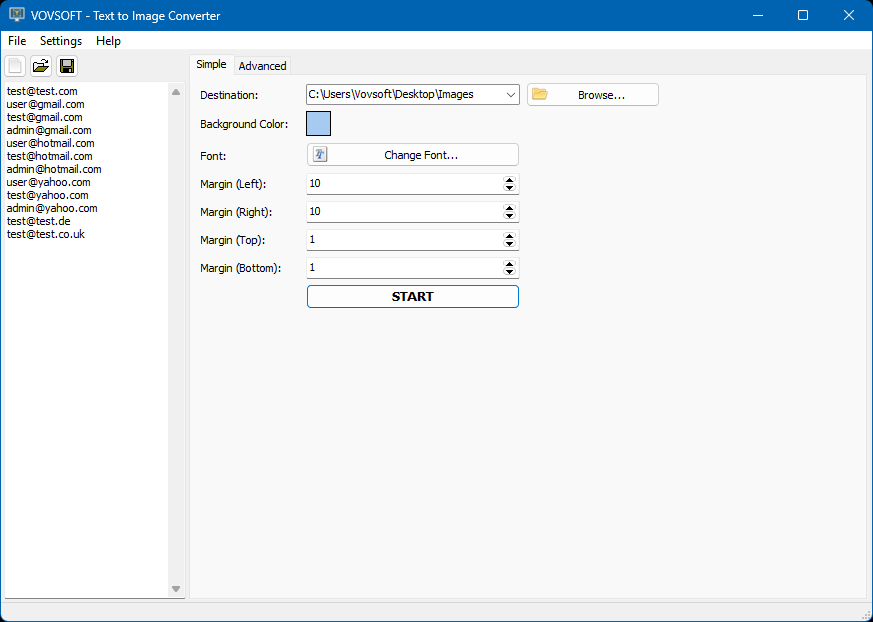


Vovsoft Text to Image Converter is a streamlined utility designed to instantly transform lists of plain text into individual image files. Perfect for batch processing, this tool eliminates the need to manually create graphics in complex editors. Simply paste a list of text, choose a color or custom background image, customize your layout, and let the software automatically generate a dedicated image for every line of text in seconds.
With its intuitive interface, you can customize fonts, colors, and layouts to ensure your message stands out. It’s the perfect time-saving solution for users who need to generate text-based visuals without the steep learning curve of high-end graphic design suites.
Speed up your workflow with the built-in batch conversion feature. Instead of creating images one by one, you can load a text file containing hundreds of lines. The software will automatically process each line as a separate image file, applying your chosen background and font settings to the entire set with a single click.
 Text to PNG
Text to WEBP
Text to GIF
Text to JPG
Text to TIF
Text to BMP
Category: Graphic Apps  Converters & Optimizers
Supports:  Windows 11, Windows 10, Windows 8/8.1 (32-bit & 64-bit)
File Size: 10.51 MB (Installer), 11.65 MB (Portable)
Language: English
License: Free to try








| Trial | Licensed | |
|---|---|---|
| Converts lists into individual images |  | |
| Commercial use allowed |  | |
| No nag screen, no ads | | |
| Lifetime free updates | | |
FREE Download (Installer) Download (Installer) Download (Portable) Download (Portable) | $19 Purchase |
 To receive license key and use all features of the software, use secure order at our financial partner, PayPro Global. To initiate the transaction, click the "Purchase" button above. Your license key will be immediately delivered after the registration. By using this license key, you can activate the product on the computer you want to use. The entire process needs only a few minutes.
A purchased license will be valid forever and includes future updates, all new functions will be available for existing registered users.
Finally, your registration enables us to improve our programs and continue developing quality software in the future. If you like this application or want to see new features, please consider registration. Thank you!
 File Converter Software Vovsoft Text Utilities Difference between Installer and Portable Editions Vovsoft Portable Software List Text to Image Converter Feature Requests

I like this program and how easy it is to use.
— Anonymous User







 Hide Files
  OCR Reader
  Text Edit Plus
  Text Statistics Analyzer
  Text to MP3 Converter