

 Purchase $19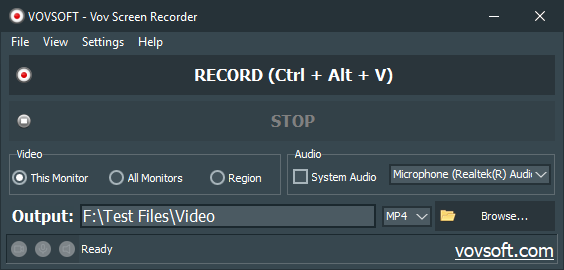


Vov Screen Recorder is a handy tool to capture computer screen, i.e., record the ongoing activities on the screen. Using Vov Screen Recorder, you can record your desktop to create a how-to video to demonstrate working of a program, compile a products demo video for some client, record gameplay to post on social networks or record any other activity on the screen to share with friends or stakeholders, or to upload on video streaming services like YouTube. Vov Screen Recorder can capture a specific area or the full screen.
A lightweight super-simple screen recorder application to capture your desktop with one click. All popular video formats are supported such as AVI, QuickTime Video (MOV), MP4, MPEG, FLV, WMV, Matroska Video (MKV), and animated GIF. You can also include system audio or your voice using your microphone. Vov Screen Recorder includes and uses libraries from the FFmpeg project and it does not require any additional video codecs. It supports multiple monitors, software encoding and hardware acceleration for AMD, INTEL and NVIDIA GPUs (H264 and HEVC).
 Supports software and hardware encodings
Supports multiple monitors
Supports capturing microphone audio
Multilingual interface
Supports full screen or region/window recording
Supports mouse pointer highlighting
Supports capturing system sounds
Installer and portable editions
Category: Graphic Apps  Screen Capture
Supports:  Windows 11, Windows 10, Windows 8/8.1, Windows 7 (64-bit)
File Size: 22.54 MB (Installer), 27.89 MB (Portable)
Language: English, Abkhazian, Albanian, Arabic, Bulgarian, Catalan, Chinese, Czech, Dutch, Finnish, French, German, Greek, Hebrew, Hindi, Hungarian, Italian, Japanese, Korean, Norwegian, Persian, Polish, Portuguese, Romanian, Russian, Slovak, Slovenian, Spanish, Swedish, Turkish, Ukrainian, Vietnamese
License: Free to try








| Trial | Licensed | |
|---|---|---|
| Captures computer screen |  | |
| Commercial use allowed |  | |
| No nag screen, no ads | | |
| Lifetime free updates | | |
FREE Download (Installer) Download (Installer) Download (Portable) Download (Portable) | $19 Purchase |
 To receive license key and use all features of the software, use secure order at our financial partner, PayPro Global. To initiate the transaction, click the "Purchase" button above. Your license key will be immediately delivered after the registration. By using this license key, you can activate the product on the computer you want to use. The entire process needs only a few minutes.
A purchased license will be valid forever and includes future updates, all new functions will be available for existing registered users.
Finally, your registration enables us to improve our programs and continue developing quality software in the future. If you like this application or want to see new features, please consider registration. Thank you!
 Hardware Acceleration with Vov Screen Recorder Vovsoft Video Software List Difference between Installer and Portable Editions Vovsoft Portable Software List Vovsoft 64-bit Software List Vov Screen Recorder Feature Requests

Excellent work.
— Imran Khan 
Bought VOV Screen recorder. Nice tool.
— Alan Napier
Superb Portable Screen Recording Software
I was looking for a portable screen recording software, which would record meetings. The idea was to capture everything spoken by others and me, so that I could focus on the topic, rather than on making notes.
Portable screen recording software is anyway hard to find. So, when I came across Vov Screen Recorder, I tried it and found that it recorded the system’s audio, but nothing that I spoke. I contacted the creator, who very kindly fixed the issue.
When I tried it again, I found that the application worked fine on one of my systems, but gave an error on the other. I thought it must be a system-related issue, rather than an application one. I contacted the creator again, and wasn’t expecting a solution.
To my surprise, he not only fixed the issue, but on reinstalling the application, I found it worked perfectly.
If you’re looking for a simple screen-recording software, try Vov Screen Recorder. It’s simple, economical, & easy to use.
— Clyde
It’s work!
I am an old-school computer scientist myself and for me the decisive factor for the quality of a program is whether it is easy to start and then works. It does .... ;-)
— STB
Thank you very much! Wonderful offer for a very useful product!
— Michalis
Very good thanks for free.
— Anonymous User
Good software, but need more options.
— Biohazard
Muy buen soft los felicito y muchas gracias!!!
— Jorge Arevalo







 Batch URL Downloader
  Health Break Reminder
  Sound Recorder