

 Purchase $19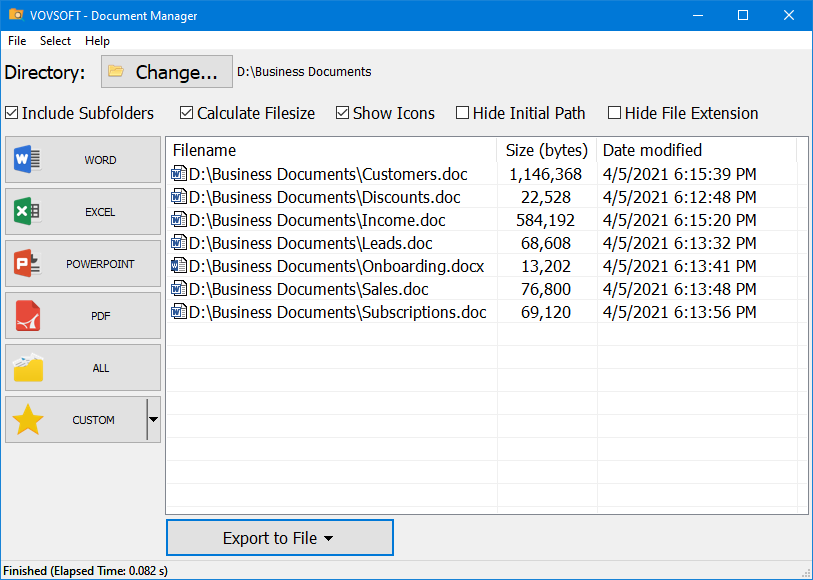


Vovsoft Document Manager can provide easy access to your documents on your desktop or laptop PC. You can manage Word, Excel, Powerpoint and PDF files in one screen. You can also customize the filetypes you wish to manage.
No matter if you are an expert or a beginner, you can still make the most of this application, since it requires no technical skills.
Basically, you only need to select the directory where you store your documents, then leave all the work to Vovsoft Document Manager as it groups them according to their file types.
You can easily explore your Word, Excel, PowerPoint and PDF files. Additionally, you can create a custom category where you can define the formats you are most interested in.
Not only can you get a list of all the files that match a certain sorting criterion, you can also right-click a file and gain access to some extra actions.
You can open the document in its default associated software, rename it, remove it from the list or you can erase it from your Windows PC without needing to access its folder. You can copy the files or the filenames to the clipboard so you can paste them later on. File lists can be exported to TXT or CSV so you can examine them more thoroughly at a later time.
Category: System Utilities  File & Disk Management
Supports:  Windows 11, Windows 10, Windows 8/8.1, Windows 7, Windows Vista, Windows XP (32-bit & 64-bit)
File Size: 3.7 MB (Installer), 2.6 MB (Portable)
Language: English, Albanian, Arabic, Bulgarian, Chinese, Czech, Dutch, Finnish, French, German, Greek, Hebrew, Hungarian, Italian, Japanese, Korean, Persian, Polish, Portuguese, Russian, Slovak, Slovenian, Spanish, Swedish, Turkish, Ukrainian, Vietnamese
License: Free to try









| Trial | Licensed | |
|---|---|---|
| Helps you manage your documents |  | |
| Commercial use allowed |  | |
| No nag screen, no ads | | |
| Lifetime free updates | | |
FREE Download (Installer) Download (Installer) Download (Portable) Download (Portable) | $19 Purchase |
 To receive license key and use all features of the software, use secure order at our financial partner, PayPro Global. To initiate the transaction, click the "Purchase" button above. Your license key will be immediately delivered after the registration. By using this license key, you can activate the product on the computer you want to use. The entire process needs only a few minutes.
A purchased license will be valid forever and includes future updates, all new functions will be available for existing registered users.
Finally, your registration enables us to improve our programs and continue developing quality software in the future. If you like this application or want to see new features, please consider registration. Thank you!
 Difference between Installer and Portable Editions Vovsoft Portable Software List Document Manager Feature Requests

Really helpful softwhere, put it use immediately, thank you for your work on needed specialised software.
 |
Ronald Coupe  |
Doc Manager worth 10 Stars
The company develops quite a number of very good and capable apps. My favorite, and worth 10 STARS is Document Manager! It has found every doc, spreadsheet and power-point, text file, etc. on my PC, and that covers 15 years of work. Found them all and their full path, so I can retrieve any, anytime.
Fast, easy, intuitive.
 | msalvatini |
Most people who use Microsoft Windows as the operating system on their computer also use Microsoft Office for their office productivity software. And when it comes to storing documents, spreadsheets and the like, most people use the default Documents folder to store their files.
If you find yourself switching between Word documents, Excel spreadsheets and PowerPoint presentations then you may be a good candidate for the Vovsoft Document Manager application. Document Manager allows you to view, open and manage all your Microsoft Office and PDF files from one location. This way you can sort your various Office files by type and do things like open, delete and rename them from a simple to use interface.
— Cindy Thomas
软件注册后效果很好
软件注册后效果很好,需要多些提高效率的软件供选择,软件详情再清楚些,特别是多国语种,否则难以选择。
— Anonymous User
Ich finde das Programm einfach genial,
Bedienung, Übersichtlichkeit, Struktur.
Bestellung, Kauf, Auslieferung alles ohne Probleme.
Deshalb *****
Es bleibt mir nur noch zu sagen bzw. zu schreiben
DANKE
— Manfred
Das Programm gefällt mir sehr!!
— Anonymous User
Tres bien le logiciel
— Alex







 Copy Files Into Multiple Folders
  Filename Lister
  Search Text In Files
  Text Edit Plus