
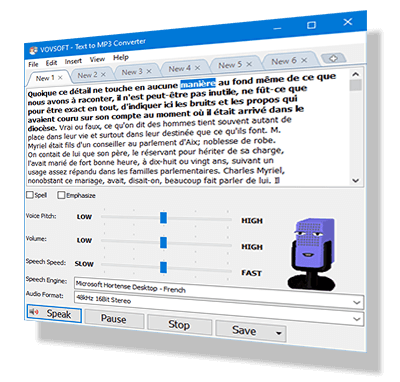

Vovsoft Text to MP3 Converter lets you easily convert text to audio and preview written content without having to actually spend time reading it. It offers options for selecting the speech engine and output format. You can choose between higher quality (WAV) or smaller file size (MP3). The "Speech Speed" setting allows playback and recording from 10x slower to 10x faster. If you're looking for a straightforward tool for text-to-audio conversion without complex steps or configurations, this simple yet capable program is worth trying.
In addition to TXT files, this software also supports loading PDF files and Microsoft Word documents. This MP3 maker software can be used for Word to MP3 conversion by loading DOC and DOCX files on your desktop or laptop computer. You can even use "Batch Conversion" to convert multiple files at once.
If you create videos, you can use this software to generate voiceovers for them. As a content creator, you can add voice narration to your video, without the need to speak on the recording yourself or hire a speaker to do it for you. This can be particularly useful when uploading videos to YouTube.
Easily convert any text to speech. Perfect for e-learning, presentations, YouTube videos, and improving accessibility. You can convert text to speech and save it as an audio file in just a few clicks. The text can be exported as an MP3 or WAV file. This program uses the preinstalled Microsoft SAPI Text-to-Speech (TTS) engine to generate voice. It can convert text of up to 500,000 characters into an audio file, that's approximately 8 hours long.
➡️ How to Add Text-to-Speech Languages in Windows
Terms and Conditions
Technical Details

Vovsoft Universal License
(The Complete Package)
 115+ programs Lifetime license All future updates
 Responses





 Installer
 Portable