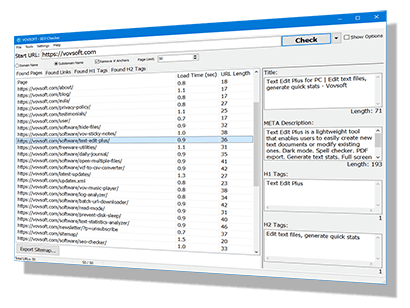
Vovsoft SEO Checker is a comprehensive software tool designed to facilitate organic search marketing and improve website rankings on major search engines like Google, Bing, and Yahoo without the need for paid ad placement. As a robust website crawler, the software efficiently scans both small and large websites to provide deep technical insights and identify the best strategies for improving search relevance. It serves as an essential utility for website owners and digital marketers looking to audit their online presence, allowing them to freely test their own sites or analyze competitor websites to uncover valuable data and technical errors.
The software excels at on-page SEO analysis, which is the practice of optimizing web page content for both search engines and users. It provides real-time data on critical site elements, including full lists of sitemaps, internal backlinks, anchor text, and heading hierarchies such as H1, H2, H3, and H4 tags. Furthermore, the tool allows users to meticulously inspect their link structure by identifying broken links, distinguishing between internal and external connections, and classifying links as dofollow or nofollow. This level of detail ensures that all title tags, meta descriptions, and content structures are fully optimized for maximum visibility.
A standout feature of the application is its embedded browser engine, powered by the Chromium-based Microsoft Edge WebView2 control. This ensures excellent compatibility with modern websites, including those that rely heavily on JavaScript and dynamic content. Unlike traditional scrapers, this built-in browser renders pages exactly as they appear to a user, enabling the software to handle cookies, maintain authenticated sessions, and even scrape content from login-required or password-protected pages.
Despite its advanced capabilities, the tool is designed for simplicity and speed. Users can initiate a check simply by entering a URL and clicking the "Start" button, prompting the application to automatically find and load internal pages by following inbound and outbound links. For those requiring more granular control, the software includes configuration options to modify connection timeouts, browser user agents, and response timeouts, as well as the ability to ignore specific extensions or URLs during the scan.
Terms and Conditions
Technical Details

Vovsoft Universal License
(The Complete Package)
 109+ programs Lifetime license All future updates
 Responses (1)




 Installer
 Portable