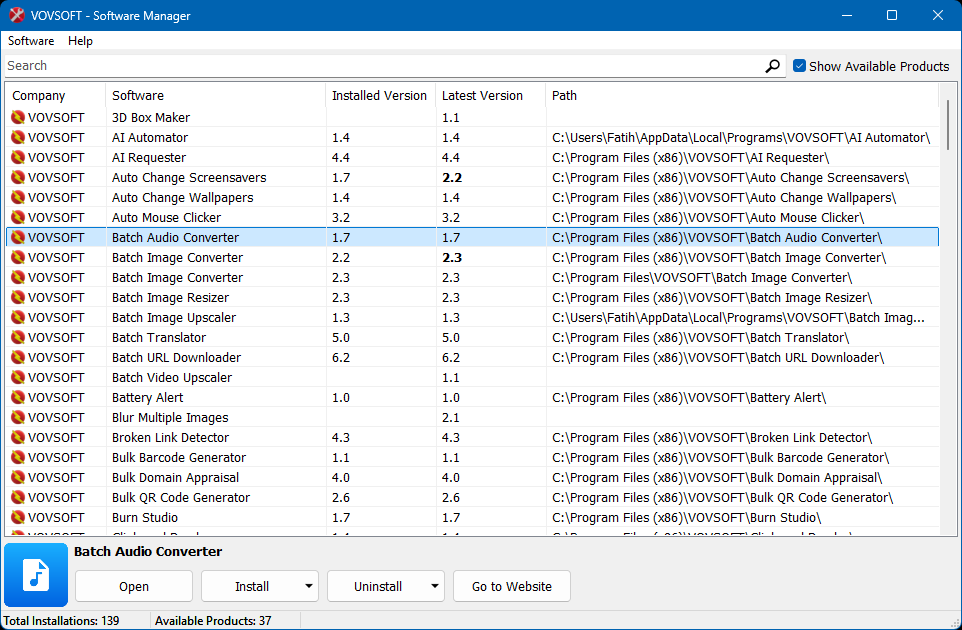
Vovsoft Software Manager is a utility designed to help users conveniently keep track of and manage their installed Vovsoft applications from a single, centralized interface.
- Comprehensive Overview & Discovery: Displays a detailed list of installed Vovsoft programs, showing the application name, current version, latest available version, and local installation path. You can easily toggle the "Show Available Products" option to discover tools you haven't tried yet, while the status bar conveniently summarizes your total number of installed and non-installed products.
- Quick Search & Detailed Insights: Instantly find specific programs using the integrated search bar. Selecting any software opens a dedicated detailed view panel at the bottom of the window, providing immediate access to core actions.
- Update Tracking & Version History: The manager helps identify out-of-date applications by comparing your installed version with the latest server release, highlighting newer available versions in bold text. You can also access a program's "Version History" directly from the menu to review recent changes.
- Installation & Uninstallation Controls: Manage your software directly through the detailed panel or a right-click context menu. The application automatically downloads and installs updates or new programs, allowing you to manage your library seamlessly using standard or "Silent" execution modes.
- Quick Access: The interface provides fast, one-click access to "Open" the application, launch the application's local folder ("Show in Explorer"), or navigate directly to the product's official website.
- Sync and Refresh: Keep your library perfectly in sync with options to refresh the local list of installations using the F5 keyboard shortcut, and manually pull the latest version data from the server.
Category: System Utilities  System Maintenance
Supports:  Windows 11, Windows 10, Windows 8/8.1, Windows 7, Windows Vista (32-bit & 64-bit)
File Size: 5.61 MB (Installer), 5.21 MB (Portable)
Language: English
License: Freeware — no nags, no ads, fully functional
Related Software


 Difference between Installer and Portable Editions
 Batch URL Downloader
  Copy Files Into Multiple Folders
  Text Edit Plus
  Text to MP3 Converter
  VCF Editor




 Installer
 Portable