This giveaway has expired!
Hide Files Giveaway
Vovsoft Hide Files is an easy to use program to protect your sensitive information from being seen or accessed. It can easily hide any files, folders or even USB drives and keep them safe with a password.
This software makes your files inaccessible and only allows you to unlock with the correct password. When you launch the application for the first time, you must provide a master password, which will need to be entered every time you launch it in the future.
A folder-locker utility that can secure your confidential files and folders. You can encrypt and decrypt your sensitive documents, photo albums, videos and any kind of data. You can password protect any secret or embarrassing files. Hide your files and folders from prying eyes. Set your password and lock your files. No one can access your files without your password.
If you are looking for a simple file hider or folder hider application for your desktop or laptop computer, you can rely on this program. It is suitable for file protection software and folder protection software needs.
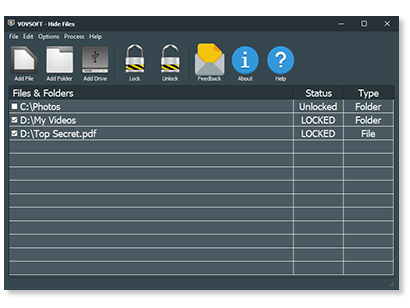
In order to hide your private files and folders securely, you can use Vovsoft Hide Files software. Add your files or folders by using the dedicated menu or drag & drop from Windows Explorer. Then, select the items you wish to hide and lock them by using the "Lock" button. Whenever you want them to reveal, all you need to do is use the "Unlock" button.
Terms and Conditions
- No free updates; if you update the giveaway, it may become unregistered
- You must download and install the giveaway before this offer has ended
- Lifetime license
- May not be resold
Technical Details
- Developed by Vovsoft
- Supports Windows 11, Windows 10, Windows 8/8.1, Windows 7, Windows Vista (32-bit & 64-bit)
 Responses (1)

TK
Apr 2, 2026 at 11:43 am (PST) |
Reply Without encryption the hiding is superficial, once an item is locked a standard windows hidden attributed folder is created on the C: drive "C:\VVSFTFLDRHD" with security through obscurity a file is created for each hidden item N.db where N is a number that appears to increase sequentially. the file is NOT an sqlite database but the original file renamed... If one enables encryption then the *.db files contain the encrypted contents and not the plain text. As I said there is zero plausible deniability, even if stealth mode is enabled which for some reason just hides the GUI from view so you cannot do anything more with the program... not even exit normally... not sure it's purpose as the C:\VVSFTFLDRHD folder with contents still remain and the process hidefiles.exe still shows in task manager details page and would have to be End tasked to return to normality. Ah just read on vovsofts product page CTRL + ALT + SHIFT + Z toggles stealth mode so now it kind of makes sense even if the stealthiness is superficial and proof of the programs activity remain. Oddly there is no portable edition of this even though that would make the most sense that the program not be installed on the host machine but just the obscure data files... renaming the appdata/roaming subfolder to be something more obscure would be advisable too. The use of fixed folder and file naming and installation on the host computer destroy the possible security through obscurity... One suggestion I can make is go a little deeper, most modern drives have multiple partitions to produce the EFI boot environment and that leaves often megabytes sometime hundreds of megabytes of slack space between GPT partitions that are free to hide away data if you compile in your own filesystem driver into your program to have an extended slack space partition table in the slack between the GPT/MBR records and boot sectors and the first partition which is often a megabyte later... to define the slack space partitions to be used for storing a few hundred megabytes of encrypted data in place that will not be touched by windows. I'm also concerned that the chosen password is shared and stored by vovsoft in association with the registered email address to enable the password recovery process to occur which is an unnecessary risk that one should be able to opt out of as vovsoft could get hacked and the password/email database stolen. Do you get a copy of SOS participants passwords even though they cannot use the recovery facility as no end user email is associated with the SOS license? If so that is unfair data exposure for no potential benefits!
Show More Comments (6) 



 115+ programs





 Download